Introducing Broadcast Overlay: Live Cricket Data on Any Stream
May. 11, 2026
Introducing Broadcast Overlay
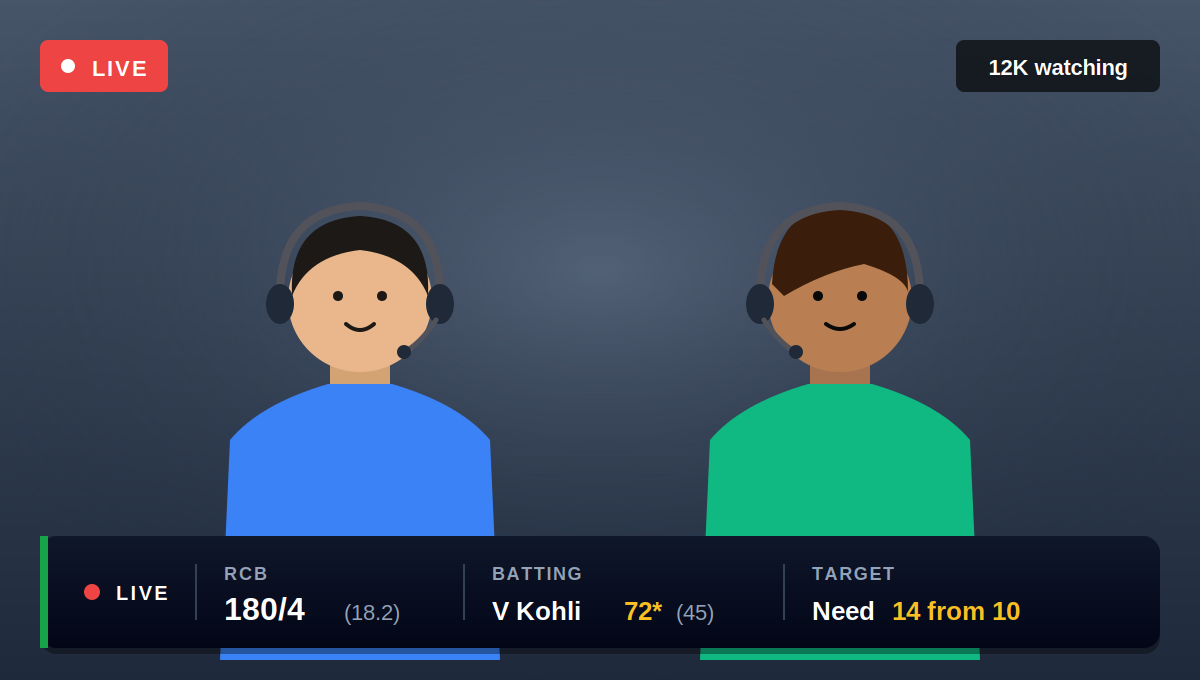
Cricket content has exploded across YouTube, regional broadcasters, and creator-led platforms especially around tentpole events like the IPL, the World Cup, and domestic T20 leagues. The talent is there. The audiences are there. But for most independent streamers, one thing has stayed stubbornly out of reach: the broadcast-grade visual layer that major networks take for granted.Live scorecards. Player cards. Partnership trackers. Run-rate graphics. The visual furniture of a real cricket broadcast.Today we're rolling out something that changes that.Meet Broadcast Overlay is a new offering from Roanuz CricketAPI that turns live cricket data into ready-to-use, broadcast-grade visuals you can drop onto any stream. It's already powering live IPL 2026 watchalong streams produced by Triune Studios, and is now available for other broadcasters and creators.In this post, we'll walk through what Broadcast Overlay is, how it works, what you can do with it, and how it adapts to your channel.
What is Broadcast Overlay?
Broadcast Overlay is a real-time, on-screen visual layer that displays live cricket match data during a stream.It pulls match information directly from the Roanuz CricketAPI the same data backbone that powers fantasy platforms, sports media, and broadcasters worldwide and renders it as professional, animated graphics on top of your stream.In simple terms, it's the bridge between live match data and your viewers' screens.Broadcast Overlay is built for:
YouTube cricket creators running watch-along, reaction, or analysis streams
Independent and regional broadcasters covering live matches
Fantasy sports streamers breaking down lineups in real time
Coaching channels and analyst-led shows
Sports media startups that want a broadcast layer without building one from scratch
If your content involves cricket and a live screen, Broadcast Overlay belongs on it.
How does Broadcast Overlay work?
We've kept the setup deliberately simple, because most cricket creators are running their own production. The entire workflow has three steps.
Step 1: You get an overlay link
Once you're onboarded, we provide a unique overlay URL configured for your channel. This link is the overlay with a live, browser-based view of your visual layer, connected to real-time match data.
Step 2: You add it to your streaming setup
Where you place the link depends on your tools.
OBS Studio - Add the link as a Browser Source (a built-in OBS feature that lets you display a webpage inside your scene). The overlay renders directly on top of your stream.
StreamYard - Open the link in a browser tab and share that screen. The overlay appears alongside your camera feed.
Restream, Streamlabs, or any other software - Treat the link like a widget. Open it in a browser window and screen share that window into your scene.
Step 3: You go live
Once the stream starts, the overlay updates itself automatically as the match unfolds. Wickets, runs, milestones, partnerships, run rate, required rate everything refreshes ball by ball without anyone touching anything.Under the hood, Broadcast Overlay rides on the same Roanuz CricketAPI infrastructure that processes millions of requests per hour at an average latency of 300ms, with live data pushed through Webhook, WebSocket, or Firebase.Score updates land as fast as they do on TV. The API runs on 99.9% uptime, so the overlay stays live as long as your stream does.The CricketAPI handles the data. The overlay handles the rendering. You handle the show.
What can you do with Broadcast Overlay?
Once Broadcast Overlay is on your stream, you have a full set of broadcast-grade visual tools at your disposal.
Display live scorecards
Show the running score, current overs, batting and bowling figures, and the state of the innings all updating in real time as the match progresses.
Show player cards
When a new batter walks in or a new bowler is introduced, surface their stats instantly: recent form, season averages, head-to-head numbers, strike rates, economy. Your viewers get context the moment it matters.
Visualize match moments
Partnership trackers, fall-of-wicket graphics, milestone callouts (fifties, hundreds, five-fors), run-rate context, required-rate flashpoints in chases the dramatic beats of a cricket match get the visual treatment they deserve.
Run match infographics
Beyond the basics, you can layer richer infographics: comparison cards between batters or bowlers, over-by-over momentum charts, powerplay summaries, death-overs analysis. Anything your show needs.
Cover any format
Broadcast Overlay works across formats like Tests, ODIs, T20 internationals, the IPL, domestic T20 and franchise leagues, World Cup matches, and circuits worldwide because it's powered by the full coverage of Roanuz CricketAPI.Picture this. You're running a live IPL watchalong on YouTube. Kohli walks out to bat with a clean player card slides into the corner with his recent scores, season strike rate, and head-to-head numbers against the opposition bowler. Two overs later he crosses fifty. The milestone graphic flashes on screen. The required run rate updates in the chase. Your audience isn't just listening to commentary anymore they're watching a cricket broadcast with you in it.That's the difference Broadcast Overlay makes. And it's exactly what Triune Studios is doing on their live IPL streams. (See an episode →)
Customisability
Broadcast Overlay isn't a one-size-fits-all product. Every channel has its own visual identity, its own production style, and its own audience expectations, so we work with each client to tailor the offering around what they actually need.That means the overlay can be shaped to fit your show, not the other way around. Whether you're running a casual reaction stream or a full broadcast-grade match coverage, we configure the offering to match.If you have specific requirements like branding cues, layout preferences, particular data points you want featured, or integration considerations with your existing setup which will bring them to the conversation. The overlay is built to be flexible, and we adjust it to what your channel actually needs.
Pricing and access
Broadcast Overlay is offered on an enterprise basis and configured per client.Pricing depends on the scope of your offering the data feeds you need, the matches and tournaments covered, customisation requirements, and the scale of your streams. Get in touch with the Roanuz team to discuss what your platform needs and we'll put together a plan that fits.
Frequently asked questions
Does Broadcast Overlay work with OBS?
Yes. Broadcast Overlay is delivered as a link, and you can add it to OBS Studio as a Browser Source. It renders directly on top of your scene and updates automatically as the match progresses.
Does it work with StreamYard?
Yes. On StreamYard, open the overlay link in a browser tab and share that screen. The overlay appears as a screen-shared widget alongside your camera feed. The same approach works for Restream, Streamlabs, and any other browser-friendly streaming tool.
What's the data latency?
Broadcast Overlay is powered by the Roanuz CricketAPI, which delivers live match updates at an average latency of 300ms fast enough to stay in sync with TV broadcasts. Data is pushed via Webhook, WebSocket, or Firebase.
Can I customise the overlay to match my channel's branding?
Yes. We work with each client to tailor the offering a visual identity, layout, the data points you want featured to match the show you've already built.
Conclusion
For years, the gap between independent cricket creators and major broadcasters wasn't talent or insight as it was production. The visual layer of a real broadcast required infrastructure most channels couldn't justify.Broadcast Overlay closes that gap. With a single link, any creator running OBS, StreamYard, or a basic browser-based stream can put broadcast-grade live cricket visuals on their screen. The data updates at 300ms latency. The setup takes minutes. The look is yours.If you stream cricket or you're planning to, with the IPL and the international calendar in full swing Broadcast Overlay is the simplest production upgrade you can make.Book a 15-minute demo with the Roanuz team and see Broadcast Overlay running on a live match.